Uptime Monitoring as Code: Site24x7, Terraform, and Zoho's OAuth
The monitoring post ended on a gap: every alarm it describes lives inside AWS, so if the account, the region, or the domain’s DNS is what broke, none of them can say so. Closing that gap needs a check that runs from outside (something that fetches the index page every minute and expects a 200), and the whole point of this project is that nothing gets configured by clicking. So: an external uptime monitor, free, defined as code.
It works. Four monitors, checked every minute from five UK locations, all up:
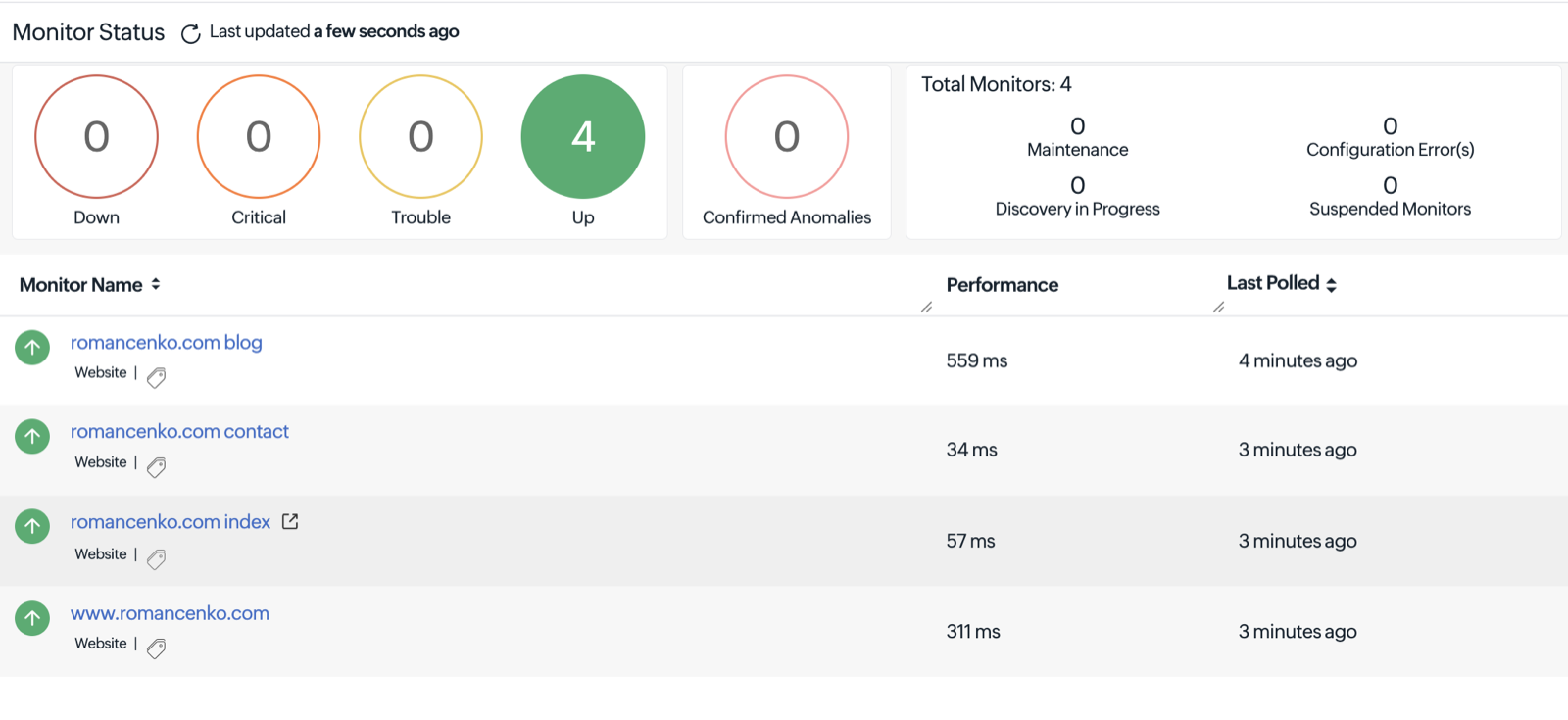
Getting there took two moving parts and a handful of surprises. The parts first.
Part one: Zoho’s OAuth, because there’s no API key
Site24x7 is a Zoho product, and its REST API authenticates through Zoho’s OAuth 2.0 rather than a simple API key. For scripts and CI the right flavor is a Self Client, and the flow has four steps:
- Create a Self Client in the Zoho API console. That gives a client ID and client secret.
- Generate a grant code in the console, choosing the scopes it may use and how long the code lives (mine lasted ten minutes).
- Exchange the grant code, once, for a refresh token. Unlike the code, the refresh token doesn’t expire.
- At runtime, exchange the refresh token for a short-lived access token and send it as
Authorization: Zoho-oauthtoken <token>, with anAccept: application/json; version=2.0header.
Step 3 is the only manual moment, and it’s one command:
curl -s -X POST https://accounts.zoho.com/oauth/v2/token \
  -d grant_type=authorization_code \
  -d client_id=YOUR_CLIENT_ID -d client_secret=YOUR_CLIENT_SECRET \
  -d code=YOUR_GRANT_CODE
The three long-lived values then live in CI as masked, protected variables. A useful habit before writing any
Terraform: prove the credentials with one read-only call (a GET /api/monitors that returns 200) so a
credential problem never gets mistaken for a Terraform problem:
TOKEN=$(curl -s -X POST https://accounts.zoho.com/oauth/v2/token \
  -d grant_type=refresh_token -d refresh_token="$REFRESH_TOKEN" \
  -d client_id="$CLIENT_ID" -d client_secret="$CLIENT_SECRET" | jq -r .access_token)

curl -s -o /dev/null -w "%{http_code}\n" \
  -H "Authorization: Zoho-oauthtoken $TOKEN" \
  -H "Accept: application/json; version=2.0" \
  https://www.site24x7.com/api/monitors        # 200 means the credentials work
That is the same check the README keeps for re-running after the trial ends. The scopes I granted were the four the docs recommend minus two (MSP and business-unit) that a single free account has no use for.
Part two: the Terraform provider
Site24x7 maintains an official provider, site24x7/site24x7. It reads those three values from environment
variables, so the provider block itself contains no secrets:
provider "site24x7" {
  data_center = "US"   # more on why this isn't "UK" below
}

resource "site24x7_threshold_profile" "url" {
  profile_name            = "romancenko.com URL availability"
  type                    = "URL"
  profile_type            = 1
  down_location_threshold = 1
}

resource "site24x7_notification_profile" "default" {
  profile_name = "romancenko.com uptime alerts"
}

resource "site24x7_website_monitor" "site" {
  for_each = local.monitors        # index, www, blog, contact

  display_name            = each.value.name
  website                 = each.value.url
  check_frequency         = "1"
  up_status_codes         = "200"
  threshold_profile_id    = site24x7_threshold_profile.url.id
  notification_profile_id = site24x7_notification_profile.default.id
  location_profile_name   = "United Kingdom"
  user_group_names        = ["Admin Group"]
}
A for_each over a small map means adding a fifth monitor is one line. CI applies it on push, like everything
else here. That’s the tidy version. The path to it wasn’t.
Where it got interesting
Which data center? Sign-up announced that the account’s data would live in Site24x7’s UK data center, a
newer region with its own domains. The credentials created on the EU console failed with invalid_client, the UK
console kept redirecting to .com, and only .com credentials worked. The Terraform provider then added a
wrinkle: its data centers are a hard-coded list (US, EU, India, Australia, China, Japan, Canada) with no UK entry,
and an unrecognized value doesn’t error; it quietly falls back to the US endpoints. That only worked because
this account’s login itself lives on the US side. Nothing in the docs says any of that; reading the provider’s
source did.
The relevant part of the source is short, and the last line is the whole surprise:
// terraform-provider-site24x7: site24x7/data_center.go (abridged)
var dataCenter = map[string]DataCenter{
	"US": {site24x7APIBaseURL: "https://www.site24x7.com/api", zohoAccountsTokenURL: "https://accounts.zoho.com/oauth/v2/token"},
	"EU": {site24x7APIBaseURL: "https://www.site24x7.eu/api", zohoAccountsTokenURL: "https://accounts.zoho.eu/oauth/v2/token"},
	// IN, AU, CN, JP, CA ... and no "UK"
}

func GetDataCenter(code string) DataCenter {
	return dataCenter[code] // unknown code: zero value, no error
}
Trial or free plan? The smoke test returned 200, which felt like success until it became clear the account
was running on the 30-day full trial. So that 200 proves the API works on the trial; whether the free plan
keeps API access isn’t documented either way. Rather than hope, the design assumes it might not: the monitors
live in their own Terraform root with their own state and their own CI job that’s allowed to fail. A provider
that can’t authenticate fails the entire plan, and a third party’s plan tiers shouldn’t be able to block AWS
infrastructure changes. If the API disappears after the trial, the monitors keep running inside Site24x7; only
managing them as code stops working.
The isolation is two small pieces of config, a separate state key and a CI job that’s allowed to fail:
terraform {
  backend "s3" {
    key = "romancenko-com/uptime/terraform.tfstate"   # its own state, in the same bucket
    # bucket, region and lock table as the main stack
  }
}uptime-apply:
stage: terraform
image: { name: hashicorp/terraform:1.4.6, entrypoint: [""] }
allow_failure: true # a third party's plan tiers must not block AWS applies
rules:
- if: '$CI_COMMIT_BRANCH == "main"'
changes: ["terraform/uptime/**/*"]
script:
- cd terraform/uptime
- terraform init -input=false
- terraform apply -auto-approve -input=falseA fresh account is empty. The first apply failed: every website monitor needs a threshold profile, and a new account has none. Fixing that revealed the same problem for notification profiles: the error only ever names one missing prerequisite at a time. Rather than guess the rest, a temporary read-only CI job (it already held the credentials, so they never had to leave CI) listed what the account actually contained. That’s how the next surprise surfaced: when a profile isn’t specified, the provider takes the first one the API lists, and for locations that was Asia Pacific. Right for nobody visiting a UK-hosted site. Anything that matters is now pinned by name.
Retrying old jobs. One failed run was “fixed” by hitting Retry on an old pipeline job, which re-ran the old commit’s code and collided with the new run on the Terraform state lock. Retry re-runs the old code; a fix needs a new commit.
What’s still open
The honest status is one crossed finger: everything works on the trial, and I don’t yet know whether the free plan keeps the API. The trial ends in mid-October, and the README carries the date and the one-line smoke test to re-run. If the API is gone, the four monitors stay put and the job goes red-but-harmless; if it survives, this whole setup is free forever. I’ll update this post with the answer either way.
The lessons that transfer beyond Site24x7:
- Prove credentials with a read-only call before writing any Terraform.
- Test against the plan you’ll actually be on. A
200from a trial is not evidence about the free tier. - Isolate third-party providers. Their failure modes shouldn’t share a state file with your infrastructure.
- Provider defaults usually mean “first item in the list,” not “sensible.” Pin what matters.
- When the docs are silent, read the source. It was a five-minute read and it explained two of the surprises.